Find businesses to sell to. Never the same one twice.
Type a search like you would on Google. Leadfield brings back new businesses with their phone, website and rating, checks each website for an email address and who runs the business, and skips every business already in your list.
For Windows 10 and 11. Your first 50 leads are free, with no card and no sign-up.
How it works
From a search to a short list in about a minute
Type who you want to sell to
Any industry, any town: "dentists in Denver", "property managers in Las Vegas", "roofers near Tampa". Pick 10 or 20 new leads.
Get businesses you haven't seen
Leadfield pulls names, phones, websites, addresses and ratings, then reads each website for emails, social pages and the owner's name.
Reach out and keep track
Pick an email template with the business and contact name filled in, or export drafts for many leads at once. Mark who you've contacted and add notes.
No repeats
Every search picks up where the last one stopped
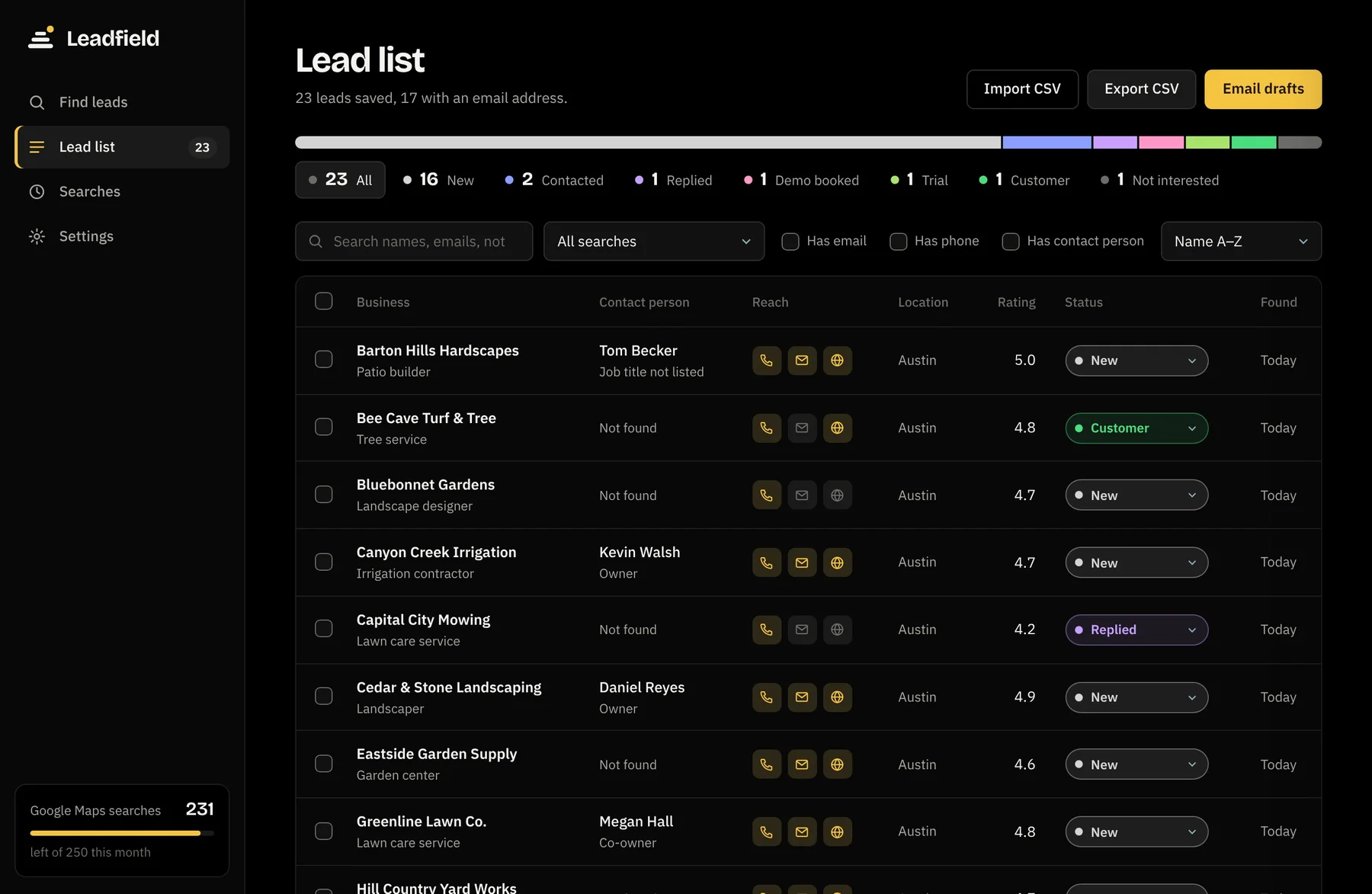
Leadfield remembers every business it has shown you, matched by phone, website, name and address. Run the same search tomorrow and you only see new ones, without wasting searches on pages you've already read.
- Duplicates are skipped automatically, even across different searches
- Remove a lead once and it never comes back
- See every search you've run and find more with one click
Ready to send
Know who to ask for, and what to say
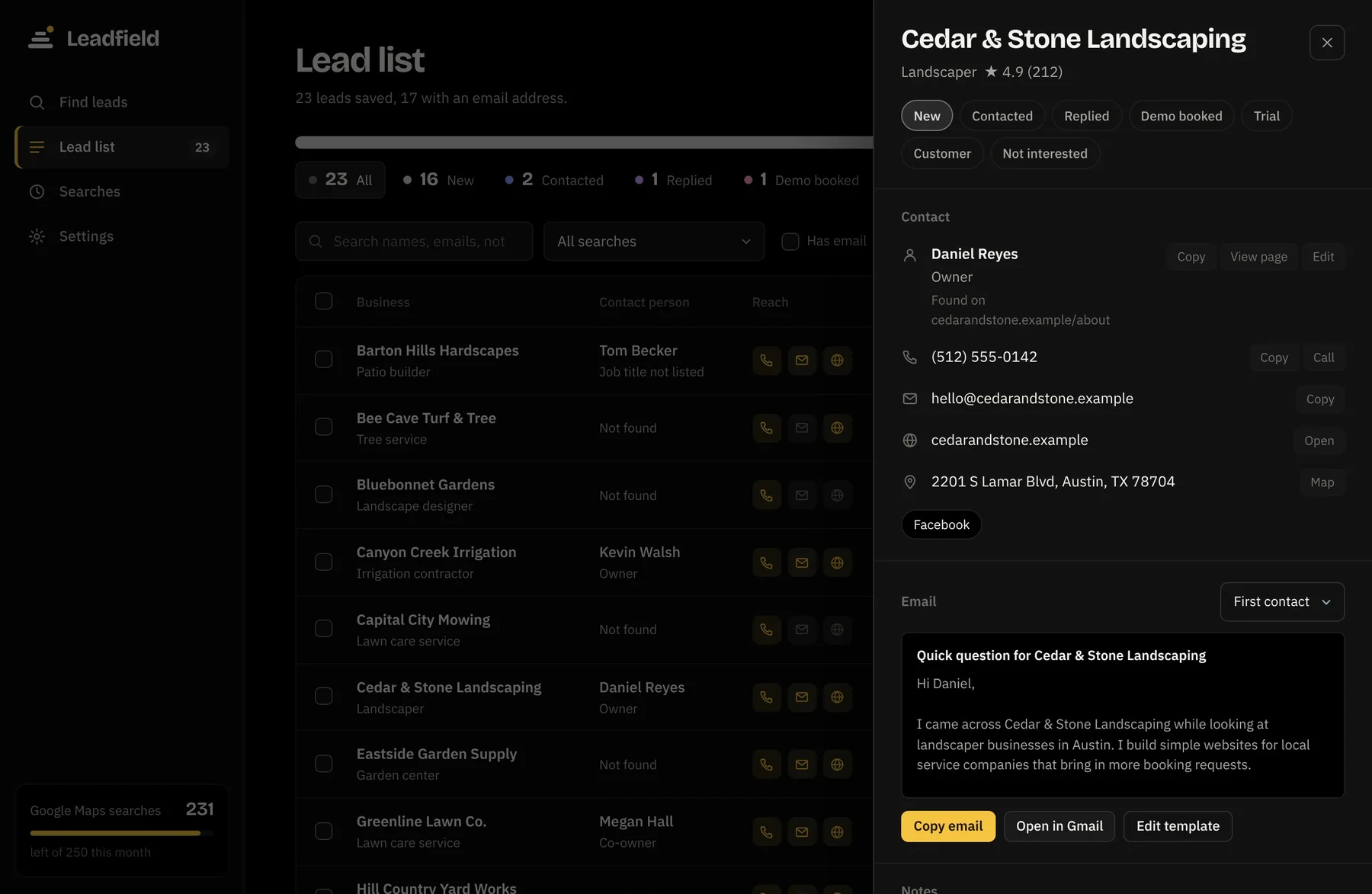
Open any lead to see who runs the business, their contact details, a ready email from the template you pick, and your notes. Send it from Gmail in a click.
- The owner or manager's name and job title, when their website clearly says it
- Templates for first contact, follow-ups and demos, plus your own, that greet people by first name
- Tick a batch of leads and export a filled-in draft for each one, ready for a mail merge
- Emails and Facebook or Instagram pages found on business websites
- Statuses from New to Customer, plus notes. Your leads stay on your PC
Pricing
One price. Yours to keep.
No subscription. Try Leadfield with your first 50 leads, then unlock it with the license key from your receipt.
Google Maps search runs through your own free SerpApi account, which includes 250 searches a month with no card. Leadfield shows you how to set it up in two minutes.
- Unlimited leads, any industry
- Use it on up to 3 PCs
- Free updates for version 1
- Email help from the person who made it
- 14-day refund if it's not for you
Secure checkout by Gumroad. Or try it free first.
Questions
Good to know before you start
What do I need to run it?
A Windows 10 or 11 PC and an internet connection. Leadfield opens in its own window, with nothing else to install.
Do I need a Google account or an API key?
For Google Maps results, you'll need a free SerpApi account. It includes 250 searches a month with no card, and each search returns up to 20 businesses. Leadfield never charges you for searches. Prefer no account at all? Switch to OpenStreetMap search, which is free but knows fewer small businesses.
How does Leadfield find the contact person?
It reads the business's own website, including its about and team pages. It only shows a person when the site clearly names them with their job title, like "Maria Lopez, Owner", and it shows you which page it came from. When it isn't sure, it says "No contact person found" instead of guessing. You can add or correct a name on any lead.
What happens after the free trial?
After your first 50 leads, searching pauses until you enter a license key. Everything you found stays in your list, and you can still view, edit and export it.
Windows says "Windows protected your PC". Is that safe?
That message appears for new apps that aren't from the Microsoft Store. Click "More info", then "Run anyway". You only need to do it once.
Can I use it on more than one computer?
Yes. One license key works on up to 3 PCs. If you replace a computer, get in touch and I'll free up a spot.
Where are my leads stored?
Only on your PC. Leadfield has no account and no cloud server. It talks to SerpApi or OpenStreetMap to search, to business websites to look for emails, and to Gumroad once a week to confirm your key.
Does Leadfield send the emails for me?
No. It writes them for you, and you send them from your own email. Copy one, open it in Gmail, or export drafts for a whole batch of leads to use with a mail merge tool. Nothing goes out without you.
Is it OK to email the businesses I find?
Yes, as long as you follow the rules where you live. In the US, CAN-SPAM requires you to say who you are, include a postal address, and honor requests to stop. Leadfield gives you the contact details; how you use them is up to you.
What's your refund policy?
If Leadfield isn't right for you, ask within 14 days of buying for a full refund. Refunded keys stop working.
Who's behind it
Built for my own businesses first

Braden Pascua
Founder of Leadfield | Entrepreneur
I'm an entrepreneur and business manager in Hawaii. I built Leadfield to find new customers for my own businesses without spending hours copying details out of Google Maps. Now I'm making it available to other small business owners and salespeople.
Reach me directly
Questions before you buy, a lost key, or moving to a new PC: I'll get back to you.